Original photo
Prompt
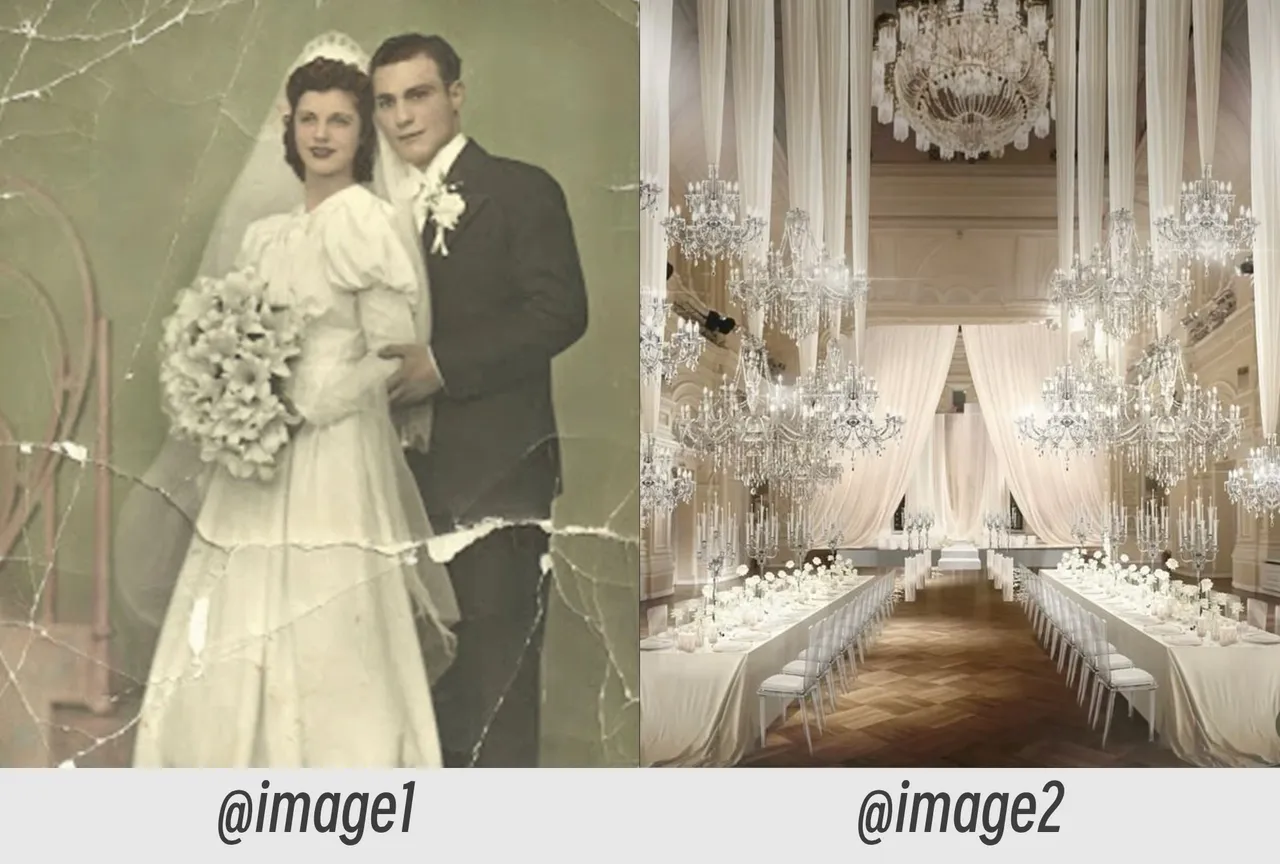
An old family photo from the reference @image1 comes to life. The couple stands together in an elegant wedding chapel @image2, gently embraces each other, smiles emotionally, and looks at one another with love.
Unlock Pro Models & 1080p — Up to 61% Off
 ImageToVid
Sign Up & Get Free Credits
50 Free Credits Today. More Rewards Tomorrow.
ImageToVid Sign Up & Get Free Credits
50 Free Credits Today. More Rewards Tomorrow.
Create consistent AI videos from reference images. Upload reference images, enter a prompt, and create high-quality AI videos with consistent characters, products, and scenes. Our AI reference to video generator is ideal for animated films, product ads, brand campaigns, and digital content creation.
Explore ready made templates designed to help you turn reference images into consistent video content for storytelling, marketing, and more.
Prompt
An old family photo from the reference @image1 comes to life. The couple stands together in an elegant wedding chapel @image2, gently embraces each other, smiles emotionally, and looks at one another with love.
Upload your reference images, describe your idea, and let the AI generator transform your vision into a consistent video.

Upload clear reference images of your character, product, or scene. Front-facing portraits, full-body photos, and high-quality product images usually deliver better results with an AI reference video generator.

Describe the movement, environment, and camera style you want. Your prompt guides the action while the reference image to video system keeps the original subject appearance consistent.

Let the reference to video free process your images and create a new video. Most short clips are generated within seconds and are ready for sharing, editing, or social media use.
Creators use reference images to build consistent characters, showcase products, and develop engaging visual content faster.
Upload character designs, concept art, or reference images and use reference to video AI to transform them into cinematic animated scenes. Create consistent characters, immersive environments, and dynamic storytelling sequences for films, animations, and creative projects.
Provide product images and let a free AI reference to video generator create realistic demonstrations, advertisements, and promotional clips. Showcase products from different angles without repeated photography sessions.
Upload your photos and create short reference image to video clips with creative movements. Produce engaging TikTok, Instagram, and YouTube Shorts content without filming every scene manually.
Create more controlled AI videos with better consistency, faster generation, and stronger visual accuracy compared with traditional AI video workflows.
Reference to video AI preserves facial features, clothing, and visual identity across every scene, helping you create videos where the same character remains consistent from beginning to end.
Export crisp 1080p HD videos with smooth motion and sharp details. Every reference image to video projects is optimized for social media, marketing campaigns, and professional-quality content.
Replace expensive filming and complex editing with AI. A free AI reference to video workflow lets you turn existing images into polished videos while saving time, effort, and production costs.
Focus on your content—not someone else's logo. Every video generated with our AI tool is exported without watermarks, giving you professional results ready for social media, marketing, or client work.
Go from reference images to a finished video in under one minute. The AI reference video generator delivers ultra-fast results, so you can create, test, and share content without long waiting times.
Upload JPG, JPEG, PNG, WEBP, or other popular image formats without extra conversion. The reference image to video engine processes different file types seamlessly, so you can start creating videos from almost any visual asset.
See how creators, marketers, and designers use image to video technology to create consistent characters, engaging videos, and professional visual content.
"Reference to video helped me keep my AI character consistent across multiple clips. The face and outfit stayed accurate even in different scenes."
"I uploaded product images and created promotional videos quickly. The AI generator saved hours of manual editing work."

"The image-to-video workflow is simple. I created social media videos from photos without learning complicated editing tools."
Explore common questions about AI video creation, image uploads, text prompts, video quality, and creator workflows.
Your reference images define the subject. Your prompts define the action. Create new videos with online Reference to Video AI today.